VELOCIFIRE Wireless Mechanical Keyboard – TKL71WS with Ice Blue Backlit

The VELOCIFIRE Wireless Mechanical Keyboard TKL71WS 71-Key Tenkeyless Brown Switches Compact Gaming Keyboard with Ice Blue Backlit for Copywriters, Typists, and Programmers is the best keyboard I’ve ever owned, and just purchased a second one for only $25.99.

Couple years ago, I had grown tired of the big old Full-size Wireless Microsoft or Logitech no backlit squishy keyboards that I had been using for decades, and decided to test some new ones. Had never had a backlit keyboard, and was having to grab a light too often to see where a key was, even when a small desk lamp was on.

WOW!!! Can’t believe it took me that long to get a backlit keyboard!? Am no gamer, so was wanting to avoid one with flashing lights. Desktop space was also important—especially the Prime Desktop Real-estate area under and in front of the display (I use gas spring arms for displays).

So many choices!?! Ended up buying four to test. Liked the VELOCIFIRE Wireless Mechanical Keyboard, TKL02WS 87 Key w/ white light the best for over a year, but the nice soft blue light from the TKL71WS kept calling me – it looked so small though, and where were all the keys!?!

Then again, the TKL71WS was not only incredibly lightweight compared to the ship anchor weight of the TKL02WS, but its footprint didn’t require much Prime Real-estate area.

Read more

Classic Block ­– replicates old Classic Editor ‘while inside the WordPress block editor

The WordPress Gutenberg Block Editor drove humble me away from running my primary Blog at WordPress.com. ‘Following the launch of WordPress 5.0 in December 2018’, the WordPress Block Editorwas set as the default editor and replaced the classic editor’.

I started blogging on Blogger before Google purchased it in 2003. Heck, I even learned how to write my posts in HTML before leaving Blogger in May of 2004. Still, that Gutenberg Block Editor kicked my buttocks every time I tried it. Even setup a free WP blog site to just test the Block Editor.

Had even purchased a $300 WP Business plan to avoid using that durn Block Editor on my Linux Newbie – Since 1996 primary blog. Started looking for a Web Hosting service during that 1-year WP Business plan subscription—hey, I wasn’t about to pay $300 every year for a simple personal blog.

Jeez…what a pain that search was!!! Long story, but the short of it was I settled on a Hostinger 4-year Introductory plan for a onetime cost of $107.56 (about $2.25 a month). Renewal price will be a onetime cost of $335.52 – in 10/19/2026. Gotta check both the Introductory prices & the Renewal prices on any plan you check out!

4-years for the WP Business plan is $1,200. I’ll look for a coupon before renewing in late 2026 to see if that $335.52 can be lowered a tad, but that price breaks down to just $83.88 a year, which is still a bargain.

Read more

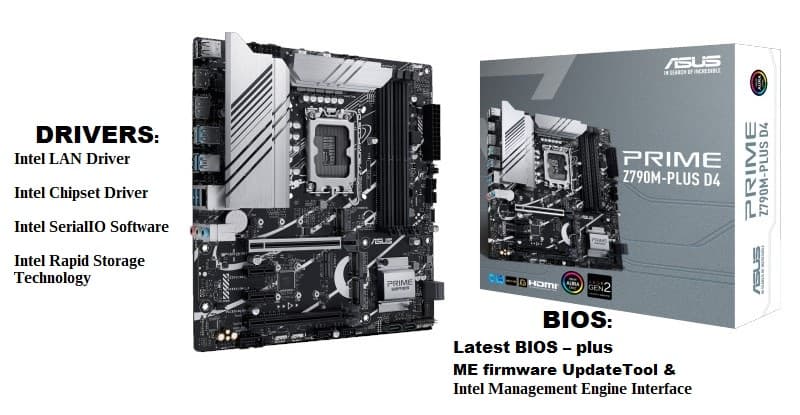
ASUS Prime Z790M-PLUS D4 mATX MoBo – BIOS & Drivers

I have found that finding the right ASUS Z790M PLUS D4 drivers can be frustrating for this one. Since 2005/2006 I have purchased $60-$90 motherboards for my builds, but decided to ‘splurge’ on the ASUS Prime Z790M-PLUS D4 mATX MoBo – $171.89 + $12.03 Tax = $183.92.

Requirements were – Micro ATX, Intel Z790, LGA 1700, and 1Gb LAN motherboard. Have moved away from the big ATX & small ITX boards, and prefer the mATX boards and cases now—fact is, I was going to be removing (intact) an older board from my favorite case, a APEVIA X-QPACK3 mATX case, and building a new Intel® Core™ i9-13900K system in it.

I didn’t find a huge mATX selection, and PCPartPicker only had TWO listed, and I went w/ the ASUS Prime Z790M-PLUS D4.

(*1/31/2024 UPDATE: new info in ASUS Prime Z790M-PLUS D4 mATX MoBo: Restore an Image and/or do a Clean Install post*)

Read more

Builds & Upgrades — Part 5 (FINAL – Before & After)

Finished up new Build yesterday ‘n have it setup in my primary desktop spot – posting this from it right now. 👌👍🙌😁

Here are: Part 1, Part 2, Part 3, and Part 4.

Before’ as in the intact MoBo I moved out of the Apevia X-Qpack3 case, and ‘After’ as in this new Build inside it now. I name most of my computers after the cases I use to build them, and I’ll update the new components in ‘Apevia’ soon.

Here is a closer look at the new benchmark results – from UserBenchmark:

Read more

PorteuX 0.3 – ‘The Next Experience’ — Part 2

PorteuX 0.3 – ‘The Next Experience’ — Part 1 covered ‘Setting up PorteuX 0.3‘ & ‘Post Setup‘ – and you’ll need to refer to it for some of the info on using GParted to prep the Target device ‘n etc. Part 1 also covered how to set up the different PorteuX 0.3 (github) desktop environments—KDE, GNOME, LXDE, LXQT, MATE, and XFCE in either stable or current options.

Part 2 will be on how to set up the porteux-v0.3-xfce-4.12-stable-x86_64.iso wid a Cinnamon DE. The Developer says: ‘Xfce 4.12 is the recommended version for the best balance between performance and flexibility. Many patches have been applied to this Xfce version to improve the user experience.‘ You can use another version, but the xfce 4.12 stable version had the Screenshot app in it ‘n not all versions had that app. PorteuX 0.3 is very new ‘n has some minor bugs and/or slight differences in app options of various DEs.

Read more

Translate »