
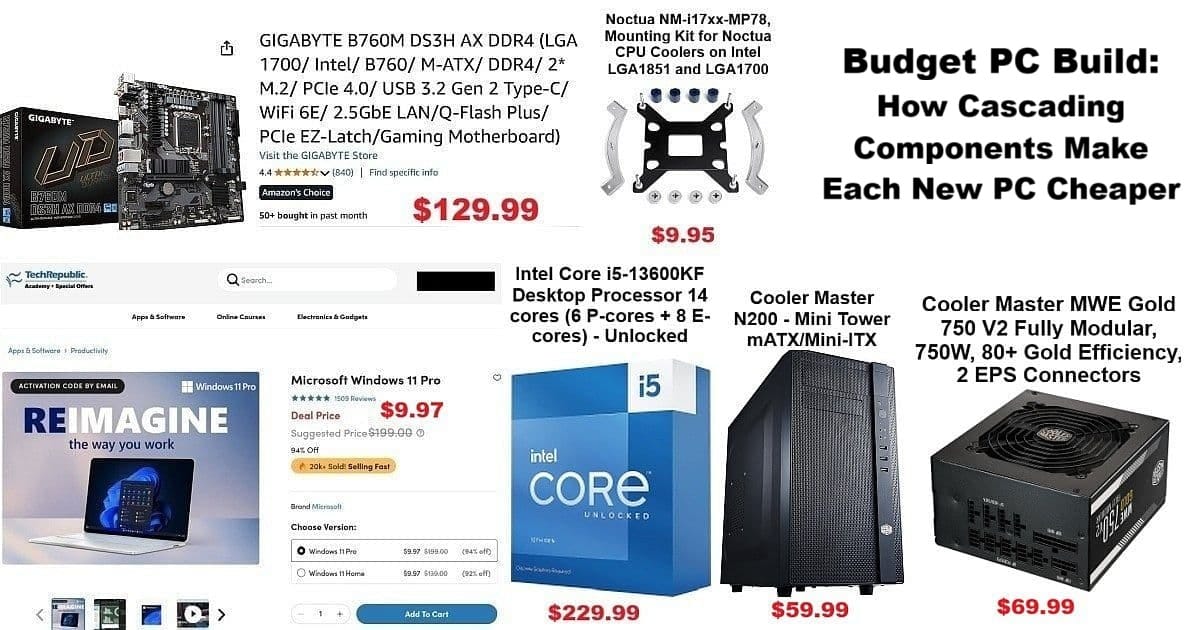
Building a budget PC build isn’t just about saving dollars upfront—it’s about leveraging previous hardware investments to make every new rig more affordable and strategic over time. This journey began thanks to the jaw-dropping $9.97 Windows 11 Pro deal from TechRepublic Academy, which became the catalyst for this round of upgrades.
Whether your first build costs $550 or $1050, BYOPC (Build Your Own PC) strategies help you cascade older components forward, lowering the cost for every subsequent system. Here, you’ll discover how cascading, gifting, and repurposing parts create a long-term ecosystem where each new build gets cheaper—a method that keeps your setups current but your wallet happy.
The $9.97 Catalyst: Win11 Pro from TechRepublic Academy
Let’s start with the deal that set this project in motion. TechRepublic Academy‘s limited-time $9.97 Windows 11 Pro offer made upgrading irresistible—it transformed the build from hypothetical to happening. In today’s world, affordable genuine Windows licenses can be a pivotal part of any budget PC build, massively slashing setup costs and opening new options.
This move wasn’t just about saving money; it redefined the value proposition, triggering a full hardware shuffle. For builders, the impact is more flexibility, easier multi-PC management, and the freedom to keep older machines secure and useful.

References:
An Unbelievable Deal: Upgrade to Windows 11 Pro for Only $9.97 – PCMag
Make your dusty old PC feel brand new for just $15 with this upgrade – Mashable
The Three-PC Ecosystem: How Cascading Works
This budget PC build isn’t a one-off—it’s the latest chapter in a continuous three-PC desktop cycle. Keep one “MAIN” machine at peak performance, a “TEST” system for experiments, and a third device for backup, special projects, or gifting. This method naturally grew out of years of cascading upgrades.
When a new MAIN PC is built, the previous MAIN moves—intact—down, upgrading the TEST slot. Components flow downward, so every build leverages both new and previously purchased parts. Parts like RAM, drives, cooling, and even GPUs are recycled; upgrades target bottle-necks but reuse working gear.
Why each component cascaded:
RAM: Still high-capacity and reliable, so it’s reused for multitasking and VMs.
Drives: SATA SSDs and HDDs remain fast enough for daily use and backups.
Cooler: Noctua U12S is proven, and a cheap mounting kit keeps it current with new CPUs.
GPU: GTX 1660 Super still handles mainstream workloads and moderate gaming.
The “Frankenstein” Effect: Gifting Older Builds
Take “Frankenstein”—my i9-9900 system built in 2022 from parts retired from earlier builds. Mini-ITX case, recycled GPU, reliable PSU. By November 2025, it was gifted to a local family who needed it—a transition only possible due to cascading strategy.
This is the core of the budget PC build approach: older systems never turn into e-waste. They get gifted to friends, family, or anyone needing solid hardware. Gamers can pass down to siblings, builders create dedicated servers, and every cycle brings new possibilities.
What I Already Had: The Component Ecosystem
Before spending on new hardware, this round’s costs were shaped by parts inherited from previous builds:
Kingwin dual-bay tray-less rack (KF-251-BK)
32GB RAM
GTX 1660 Super GPU
Noctua U12S cooler
Why these matter:
The Kingwin rack enables quick drive swaps and is indispensable for backup and testing.
Large RAM means less reason to upgrade for most workflows.
The GTX 1660 Super, while not latest-gen, is a reliable performer.
Noctua U12S required only a new bracket to keep running cool and quiet.
If starting from scratch, these savings alone would push the build closer to $800–$900.
What I Actually Bought
Purchased for this build:
CPU: Intel i5-13600KF – $229.99
Motherboard – $129.99
Noctua NM-i17xx-MP78 mounting kit – $9.95
Cooler Master N200 – $59.99
Cooler Master MWE Gold 750 PSU – $69.99
Total: $509.88 + $35.69 tax = $545.57.
A true budget PC build means only buying essentials. The i5-13600KF is versatile, supporting gaming, productivity, and content creation—ready to cascade into a TEST or secondary role in years to come.
The Cooler Master N200: Why Cases Matter for Cascading Builds
Choosing the right case pays off. The N200’s external drive bays support my Kingwin rack and essential hot-swapping workflow. Its layout fits both the current and future motherboard generations, meaning easier upgrades and durability.
For a budget PC build, the case isn’t about looks—it’s about business. Fast component swaps, easy cable routing, and flexibility for future moves.
Budget PC Build Strategy: Planning for Future Cascades
Every major component in a budget PC build should fit a larger roadmap. Here’s how to maximize cascading value:
Upgrade on the 3–5-year cycle: Premium buys (modular PSUs, latest RAM standards) last longer and transfer better between builds.
Lean mid-cycle refreshes: Target bottlenecks (CPU, GPU, motherboard) and keep reusing premium components.
Pre-map the cascade path: Before upgrading, know where each part will go—whether it’s going to serve MAIN, TEST, or be gifted downstream.
This budget PC build strategy works for all: builders eager to stretch their investment, gamers piecing together incremental upgrades, and families passing reliable hardware between generations.
The Build Process
Assembly was straightforward, though the Noctua mounting kit was critical for LGA1700 socket compatibility. Recycled parts fit as expected. GPUs, RAM, PSU, Kingwin rack—all delivered solid performance after the shuffle.
Component validation: GTX 1660 Super is more than enough for mainstream tasks; 32GB RAM is great for heavy multitasking; modular PSU leaves room for future GPU upgrades.
Outro
Ultimately, this budget PC build cost $545.57 (with tax and free shipping)—a figure possible only by cascading components. BYOPC means the first build is a big investment (think $800–$1200 if fully new), but every build afterward becomes smarter, cheaper, and endlessly adaptable.
Whether for the solo builder, growing gamer, or family planner, cascading components keep hardware out of landfills and dollars working harder. That’s the real value of thinking beyond just one budget PC build.

References: