
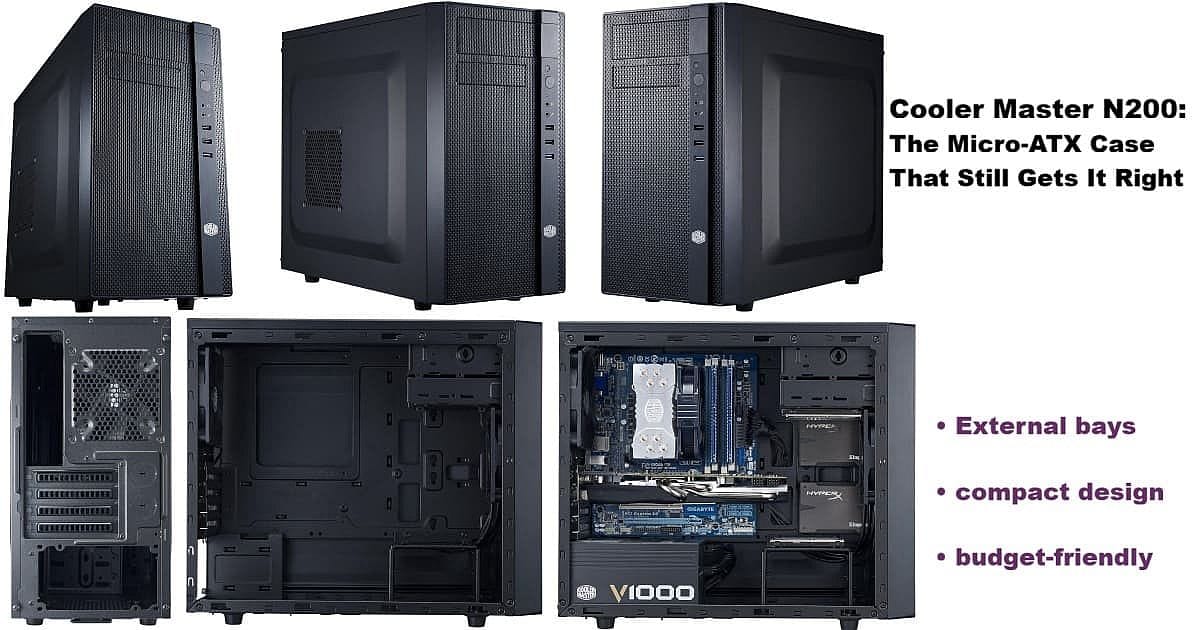
Building the i5-13600KF rig reminded me why the Cooler Master N200 is the micro-ATX case that truly solves modern problems for practical PC builders. After years searching for something like the old Rosewill FBM-01—a dependable, budget-friendly case with external drive bays—I stumbled upon the N200 purely by accident.
It’s not nostalgia driving this post. The real strength of external bays is versatility—they offer options that are rare in today’s case market. The Cooler Master N200 stands out in 2024/2025 for keeping one 5.25″ and one 3.5″ bay up front. Hot-swap drives, extra USB-C ports, card readers, fan controllers—whatever your build needs, these bays make it possible even in a compact Micro-ATX case.
This isn’t about chasing trends; it’s about keeping useful features alive for builders who need them.
Cooler Master N200 in 2025
The N200’s appeal goes far beyond its affordable price, often under $60. It does what flashy, mesh-heavy, RGB-packed cases don’t: it’s built for a purposeful workflow, not just gamer flair.
For everyday desktop duty, those front-panel bays are game changers. Whether testing hardware, backing up SSDs, or keeping a rotation of OS drives, the external 3.5″ and 5.25″ bays enable features usually reserved for larger towers.
This isn’t about clinging to old technology. It’s about maintaining access to tools that never stopped being useful.
In my main Apevia PS system and across all three rigs (see My Computers), I keep the Kingwin KF-251-BK hot-swap bay in the external 3.5″ slot. This simplifies data backup, drive swaps between PCs, and quick SSD changes for new Linux or Windows installs—all without opening the case.
It’s not just about the Kingwin, either. External bays let any builder add card readers, fan controllers, or other accessories. These are practical options that most modern cases have abandoned, but the N200 keeps them available for real-world workflows—not just RGB drama or side-window aesthetics.
Smart Micro-ATX Design
What sets the Cooler Master N200 apart is that it’s compact without feeling cramped, unlike many tiny ITX chassis. The case offers a bottom-mount PSU—a rarity in affordable micro-ATX cases—which helps both airflow and weight balance.
The side panels feature embossed, raised sections that give extra cable management clearance. This detail makes room for chunkier coolers like the Noctua U12S and helps keep the build process frustration-free.
Another thoughtful touch is the large motherboard cutout. It allows you to swap cooler brackets without tearing down your whole system, making upgrades much simpler. If you’ve ever had to remove a fully built motherboard just to add a backplate, you know why that cutout matters.
The N200 isn’t about wasted space or disposable trends. It’s a builder’s case—clear airflow paths, a practical layout, and the flexibility modern desktop users actually need.
For reference, the Cooler Master N200 measures 14.9 (H) x 7.9 (W) x 17.5 (D) inches (378 x 202 x 445 mm).
What Happened to Practical Cases?
Most contemporary cases focus on visual drama—glass, mesh, and light shows—while dropping features practical builders rely on. External bays, especially in micro-ATX formats, seem almost extinct except in bulky full towers.
It’s important to note, this isn’t a dig at gamers. In fact, gaming has driven much of the innovation in PC hardware over the years. The problem for everyday builders is that new case designs now cater almost exclusively to style and RGB customization, leaving behind some genuinely useful features.
That’s why the Cooler Master N200 stands out as a rare find in 2025. It quietly persists with a design from 2013 that still addresses real-world use cases, not just trends.
At around $60, the N200 is ideal for those who value utility over flash—builders who want to work, not just showcase their setups. More cases could benefit from balancing style with substance; the N200 proves practical design still has a place in today’s market.
The Verdict: Cooler Master N200
The Cooler Master N200 isn’t glamorous, but for those who swap drives, run multi-OS setups, test hardware, manage backups across multiple systems, or want to add fan controllers, card readers, or even optical drives, it remains the go-to choice.
Even gamers can benefit—these bays make room for front-panel fan controls, RGB controllers, and quick-access storage for game captures or streaming rigs. Versatility like this is why the N200 stands out, no matter your build style.